 Jesse Befus
“We have MFA” is a starting point. It does not tell me whether an attacker can get through it.
A code sent by text, a notification on a phone, and a security key can all appear under the same policy heading. They behave very differently when someone tries to steal an account.
I want the conversation to move beyond counting steps. We should be able to name the attack our authentication method prevents, the attacks it still permits, and why we have chosen it for the account in question.
Two questions are not two factors
A password and the answer to a security question both ask for something you know. Adding another question does not create an independent factor.
As an authentication control, I consider security questions dead. The answers can be researched, guessed, disclosed in a breach, or persuaded out of someone. A fact about your life is a poor secret, especially when you cannot meaningfully change it after exposure.
They do not belong in recovery either. If an attacker can replace the stronger authenticator by knowing your first school, the account still depends on that answer. OWASP’s MFA guidance makes this point directly: security questions are not an acceptable authentication factor.
Email codes also deserve scrutiny. They can be phished, and their independence depends on how the mailbox is protected. NIST SP 800-63B-4 does not permit email for out-of-band authentication. That does not mean every use of email is prohibited; verifying an address is a different purpose from proving someone should regain an account.
Codes expire. They can still be relayed.
SMS is convenient because most people already have a phone number. But the number is controlled through a telecommunications provider. In a successful SIM-swap or number-porting attack, an attacker can receive messages intended for the legitimate person.
SMS and voice codes can also be entered into a fake page. Removing the phone-number risk would not remove that phishing risk. NIST treats authentication through the public telephone network as restricted, requiring the risks to be assessed and a migration path considered.
My position is that SMS should not be the destination for sensitive access. Where it remains necessary to keep a service accessible, make that an explicit, monitored transition decision. A client should not have to discover the limitation only after their account is compromised.
App-generated OTPs improve an important part of this arrangement: the code can be generated without depending on control of a phone number. Hardware OTP tokens can also protect their underlying secret. Neither improvement binds the typed code to the service where the person enters it.
A correctly implemented one-time code limits reuse. An attacker who relays it during the valid sign-in window is doing something different. “One-time” does not mean “cannot be phished.” The Canadian Cyber Centre’s guidance on adversary-in-the-middle attacks explains how a fake login can sit between the person and the real service.
For new, sensitive access, I see typed OTPs as a method to move beyond. I would not call them useless: they can still improve protection over a password alone, and they remain useful where a stronger method is not yet supported. Keep that protection while you replace it. Do not confuse a useful bridge with the end of the journey.
Push needs more than an approval button
Push removes the need to type a code. A simple approve-or-deny prompt creates another opportunity: send enough requests, or make a convincing call, and hope the person approves one they did not initiate.
Number matching improves this by asking the person to match a number from the sign-in they are completing. CISA recommends it as an interim measure while moving to phishing-resistant MFA. It helps with unwanted approvals; it does not provide the same service binding as WebAuthn.
I also want the prompt to explain what the person is approving. For standard MFA during sign-in, identify the service and provide context they can check:
Standard sign-in MFA
“You are signing in to Example Bank online banking from Chrome on Windows. Approximate location: Calgary, Alberta. Did you start this sign-in?”
The service, browser, device and time can help someone recognize their own request. Location is supporting information, not proof: network routing and VPNs can make it inaccurate. The prompt should still tell them to deny a request they did not initiate.
Step-up authentication asks for additional verification before a sensitive action. If someone is sending money, show the action that triggered the extra check, rather than presenting another generic sign-in prompt:
Step-up for a transfer
“Approve a transfer of CAD $5,000 from your chequing account ending 1082 to Alex Morgan, account ending 4421.”
That gives someone a concrete action to check against what they intended. “Approve request” asks them to make a decision without seeing the decision. The same principle applies to adding a payee, granting access, or registering a new authenticator: say what will change. Verifying the person again and authorizing the transaction are separate checks. When the prompt asks them to approve a transfer, the service needs to enforce that specific approval.
The service should bind the approval to that specific operation, including its significant details. If the amount or destination changes, require fresh approval. A sign-in approval should not authorize a transfer. Show transaction details in a trusted approval interface and verify authorization before execution. OWASP’s transaction-authorization guidance describes this approach.
I would use number matching and clear context to improve an existing push deployment, while continuing toward phishing-resistant authentication. More informative prompts help people judge a request; they do not, by themselves, make an ordinary push sign-in phishing-resistant.
Compare what the method actually proves
The graphic separates the protocol property from the direction I would take. These are common designs, not a claim about every vendor implementation. Security questions are included because they are still presented as extra security, even though they do not constitute a second factor.

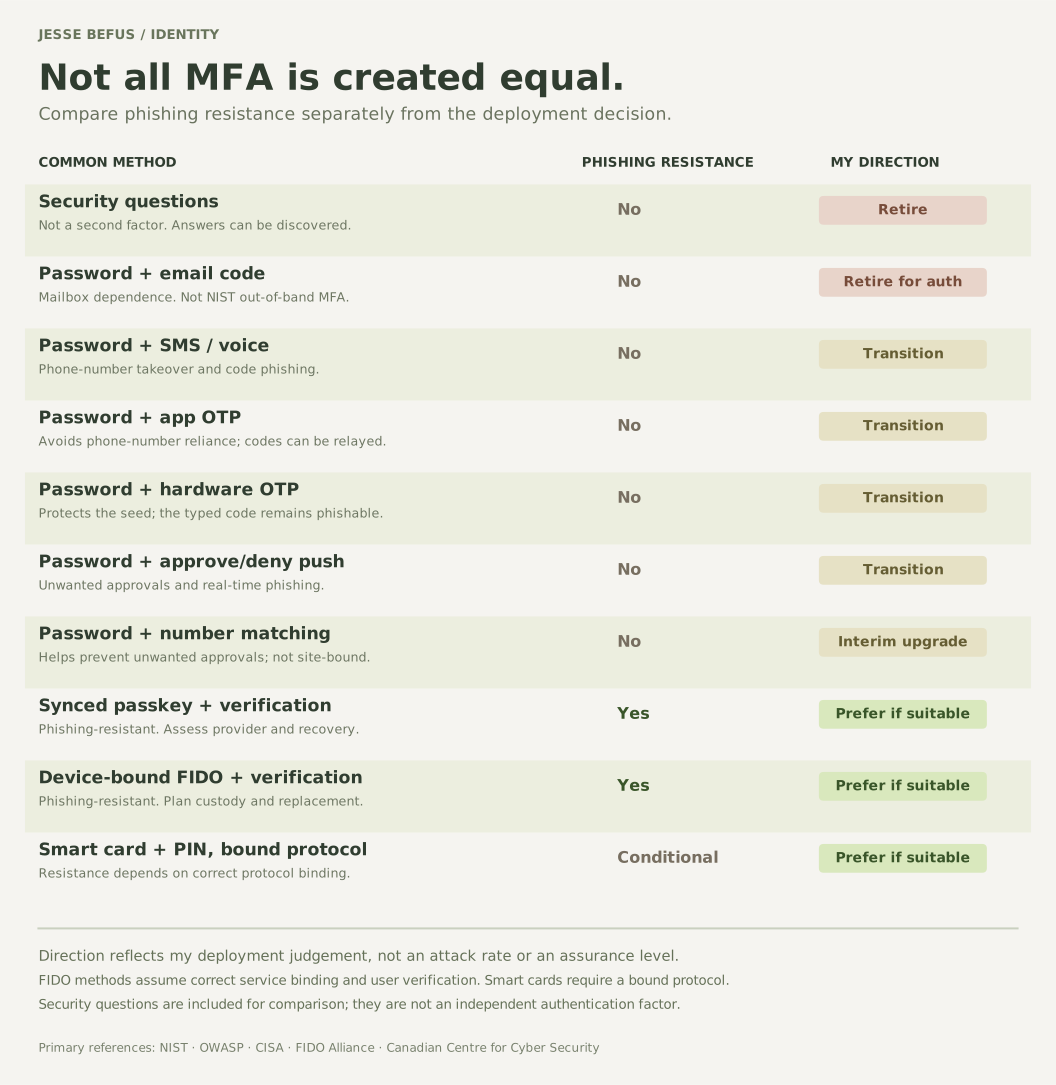
Read the comparison as a table
| Method | Phishing-resistant? | My direction |
|---|---|---|
| Security questions | No; not a second factor | Retire |
| Password + email code | No | Retire as an auth factor |
| Password + SMS / voice code | No | Transition |
| Password + app OTP | No | Transition |
| Password + hardware OTP | No | Transition |
| Password + approve/deny push | No | Transition |
| Password + number-matching push | No | Interim improvement |
| Synced passkey + verification | Yes | Prefer where suitable |
| Device-bound FIDO + verification | Yes | Prefer where suitable |
| Smart card + PIN, bound protocol | Yes, with bound protocol | Prefer where suitable |
Ordinary OTP and push flows are assessed here. FIDO methods assume correct service binding; multifactor passkeys require user verification. Smart-card resistance depends on the protocol. These are deployment choices, not attack success rates or assurance-level ratings.
FIDO passkeys and security keys use cryptographic proof bound to the legitimate service. The person does not hand the page a reusable password or typed code. A properly implemented, appropriately bound smart-card protocol can also be phishing-resistant; it is the protocol, not the presence of a plastic card, that establishes the protection.
A local PIN or biometric can activate a FIDO credential and provide the additional factor. The number of screens is not what makes the authentication multifactor. The service needs to require and verify the factors its policy calls for.
Synced and device-bound passkeys both offer phishing resistance, with different custody and recovery arrangements. Those differences matter when choosing what to accept for client access, workforce access, or privileged administration.
Give the business a way to move
For privileged access, I would make phishing resistance a priority and work toward a policy that enforces it. For broad client use, I would design a dependable enrollment and recovery experience, then reduce reliance on weaker options as people adopt the stronger method.
That means looking at all the routes into the account. If an attacker can choose a legacy sign-in or persuade support to remove the stronger factor, the new method is only part of the answer.
I would ask the team to show which methods are actually being used, which accounts can still choose weaker alternatives, and what happens when someone loses their authenticator. An “MFA enabled” count hides too much of that story.
Give users and support teams clear instructions. Test the replacement-device and lost-device journeys. Decide when stronger authentication is required for sensitive actions. Make the work visible enough that migration does not become a permanent promise.
My goal is to make the easiest legitimate sign-in a strong one, and leave an attacker fewer alternatives. That is a much more useful ambition than adding another step.
References & further reading
Primary guidance for the concepts and controls discussed here.
- NIST SP 800-63B-4: Authentication and Authenticator Management ↗Authenticator requirements, restricted telephone-based methods, email limitations, and multifactor assurance.
- OWASP: Multifactor Authentication Cheat Sheet ↗Security questions, common factor weaknesses, and attacks on authentication and recovery.
- Canadian Centre for Cyber Security: Adversary-in-the-Middle Threats (ITSM.30.031) ↗How live phishing proxies can relay authentication and why phishing-resistant MFA matters.
- Canadian Centre for Cyber Security: Secure Your Accounts with MFA (ITSAP.30.030) ↗MFA adoption and the recommendation to use phishing-resistant technology.
- CISA: Phishing-Resistant MFA and Number Matching ↗Number matching as an interim improvement while migrating to phishing-resistant authentication.
- FIDO Alliance, Passkey Central: Passkey Security ↗Service-bound cryptographic proof and local user verification.
- FIDO Alliance, Passkey Central: Passkey Types ↗Synced and device-bound credentials and their portability differences.
- FIDO Alliance, Passkey Central: Full Prevention ↗The importance of reducing weaker authentication and recovery routes.
- OWASP: Transaction Authorization Cheat Sheet ↗Displaying significant transaction details and binding approval to the operation executed.