RBAC sounds straightforward: give people access based on the work they do, rather than assigning permissions to every person individually.
That explanation usually lasts until you look at the access people already have.
There are permissions nobody remembers approving. People who moved departments years ago and kept access to their old systems. Applications with hundreds of permissions, many of which seem almost identical. Shared drives where the folder structure has become its own access model.
It gets complicated quickly.
I still think role-based access control is worth the effort. I just wish we were more upfront about what that effort involves.
When the application has a permission for everything
Picture a new application being rolled out to several business teams. The product looks solid. Then you get into the security configuration.
You can grant someone permission to view a record, update it, export it, approve it, change its status, or manage the workflow. Each of those permissions might also depend on which team they support or which records they should see.
That leads to some perfectly fair questions. Should the person approving a request also be able to change it? Does someone covering two teams need access to both sets of records? Is exporting data really part of this job?
There is no shortcut around those decisions.
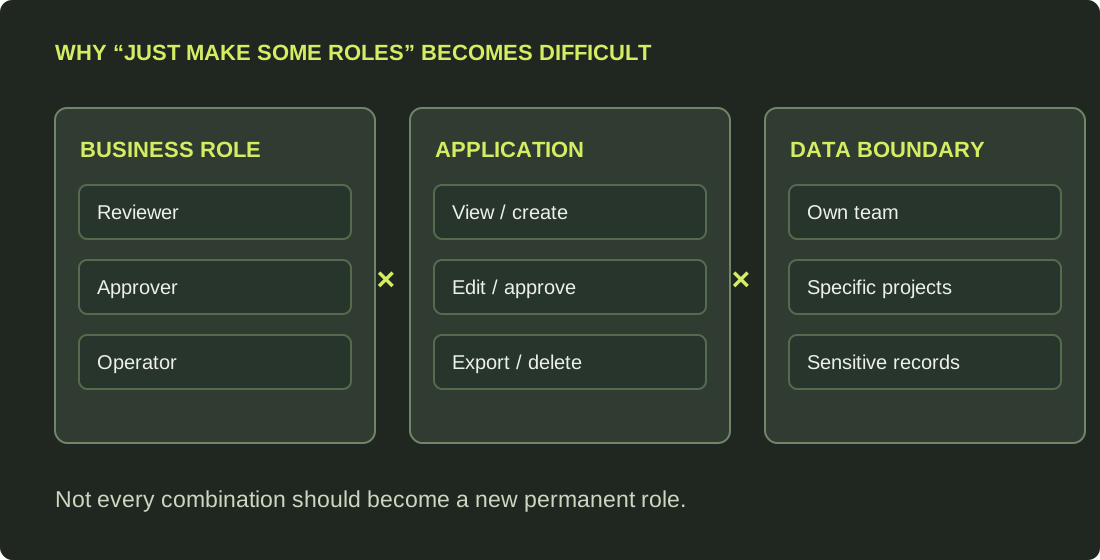
One option is to create a role for every combination. That works until the catalogue becomes so large that even the people maintaining it struggle to explain the difference between roles.
We call that role explosion. The opposite approach, a handful of broad roles with far too much access, is not much better.
Neither approach gives you the control you set out to build.
I prefer to start with what people are responsible for, then work backwards to the permissions they need. Keep the roles understandable. If access also depends on the record, location or situation, use the application’s finer-grained controls where possible rather than creating another role for every exception.
There is a limit to what this can fix, though. If the application cannot enforce the separation you need, renaming permissions and putting them into roles will not change that.
The shared folder problem
Shared drives are another good example, especially ones that have been around for years.
Imagine a network drive where the visible choices are mostly Read and Read/Write. Simple enough, until you look at the folders underneath.
Teams have made their own folders, copied old permissions, changed inheritance and shared access directly. Some of those decisions were sensible at the time. Years later, nobody has the full picture.
In some configurations, the person who creates a folder can also change who gets into it. That is a lot more authority than simply being able to edit a file.
Now someone asks: Who can actually see what’s in this folder?
The top-level group membership will not give you the full answer. You need to look at the effective permissions all the way down, including inherited and direct access.
There is an important technical distinction here. Read/Write access does not automatically let someone change permissions. That depends on the file system, ownership and delegation settings. But where people can grant access without proper oversight, the problem is real.
RBAC can help standardize who belongs to which groups. It cannot, on its own, repair a folder hierarchy where access has been delegated and changed for years.
Cleaning up access is where the time goes
This is where I think the real work begins.
Writing down the roles is manageable. Working out what access is still needed, then removing the rest without breaking something, is much harder.
You will find permissions kept because “we’ve always had them.” There will be old service accounts, special-case folders and access used by a process that runs only a few times a year. The people closest to the work may not even know that process depends on it.
Some of those permissions can go. Others need to stay, at least until there is a better way to support the work. That takes investigation, business decisions, testing and patience.
Multiply that across dozens of applications, each with its own quirks, and it becomes clear why the cleanup often takes longer than the role design.
When would I call RBAC "done"?
Certainly not when the role catalogue is approved.
I would want to be able to answer some basic questions without starting an investigation every time:
- Who should have access? The roles make sense to the people who own the work, not just the people who administer the system.
- What can they actually do? We've checked the effective permissions, including what people can't do, rather than trusting the role name.
- Who made the decision? Sensitive access has a clear owner and an approval path.
- What happens when someone moves or leaves? Old access is removed reliably, including direct grants and other paths that might be easy to overlook.
- How do we keep it that way? Reviews, exceptions and changes are part of normal operations instead of another one-off cleanup exercise.
I would also want to know where access creates conflicts. If someone can both submit and approve the same sensitive transaction, for example, that needs to be prevented or deliberately controlled.
That is my definition of a successful first implementation: we know what access people should have, the systems enforce it, and there is a practical way to keep it accurate when things change. It still needs ongoing work.
How long does it actually take?
It depends on what you are starting with.
A single new application with a clean permission model may be ready in months. A large organization with legacy applications, inconsistent access and years of accumulated exceptions is a different story. That work can take several years.
For a larger effort, these are the milestones I would plan around. They overlap because you rarely finish cleaning up one part of the environment before starting work on another.
Discover and assess
Map entitlements, access paths, business owners and dependencies. Identify where the biggest risks and ownership gaps sit.
Governance and role design
Agree on role design principles, accountable owners, approval requirements and how permissions should map to real work.
Clean up the foundations
Remove unnecessary access, untangle direct grants and inherited permissions, and document constraints that cannot be fixed through roles alone.
Pilot and migrate in waves
Start with priority applications. Test who should and should not have access, reconcile effective permissions, and keep a rollback option.
Validate and expand
Increase role coverage, reduce unmanaged access and prove through reviews and testing that the model is working as intended.
Operate and improve
Keep access aligned to joiners, movers and leavers. Review exceptions, ownership and roles as systems and the business change.
I would pay more attention to the results than the number of roles delivered. How much access now goes through approved roles? How much is still granted directly? Are permissions removed when people change jobs? Do tests find access that should not be there?
Those are better signs of progress than a completed project plan.
Is it worth all that work?
I think so. I have seen enough of what happens when access grows without a clear structure to know the alternative is not easier.
Permissions pile up one request at a time. Someone gets access for a project, moves to another role, and keeps it. Managers end up approving unfamiliar technical names because they cannot easily tell what the access does.
RBAC gives us a better conversation to have. Instead of debating dozens of individual permissions, we can agree on what a job requires and build access around that.
It will not solve every problem with authorization. And it certainly will not make the old access disappear overnight. But it gives us a way to stop adding to the mess while we work through what is already there.
That is why I still believe in it. Not because it is simple, but because access should make sense to the people who use it, the people who approve it, and the people responsible for keeping it secure.